A smart home without internet is not only possible — it’s actually more reliable, faster, and more private than the cloud-dependent setup most people build by default.
Here’s something the big tech companies would rather you didn’t know. Every time your Amazon Echo responds to a voice command, that signal travels out of your home, up to Amazon’s servers, gets processed, and comes back down before your light even flickers. When your internet goes down, your entire smart home goes with it. Your lights stop responding. Your automations freeze. Your security routines fail silently. Sound familiar?
The good news is that a growing number of homeowners are building local-first smart homes — systems that run entirely on their home network, process commands in milliseconds rather than seconds, and keep working reliably whether the internet is up or not. I’ve personally tested and built this exact type of setup, and the difference in speed and reliability is immediately noticeable. This guide covers everything you need to understand, choose, and build a smart home without internet dependency — using Zigbee, Z-Wave, Thread, and Matter protocols with the right local hub at the centre.
Why Your Current Smart Home Depends on the Internet
Before building a local smart home, it helps to understand exactly why most smart home setups require a constant internet connection — and why that’s a problem worth solving.
The Cloud Dependency Problem
Most popular smart home devices — Wi-Fi bulbs, Wi-Fi plugs, cloud-based cameras, and voice assistants — are designed around a simple model. Your device connects to your Wi-Fi, your Wi-Fi connects to the manufacturer’s cloud servers, and the cloud tells your device what to do. This architecture works fine most of the time. However, it creates several serious vulnerabilities that affect real homes every day.
Reliability: When your internet drops — because of a router restart, an ISP outage, or a storm — every cloud-dependent device in your home becomes unreachable. Lights can’t be controlled. Scheduled automations fail to run. Smart locks don’t respond to remote commands.
Speed: Because cloud processing involves multiple round trips across the internet, cloud-dependent commands typically take 2–4 seconds to execute. Local commands, by contrast, run in under 100 milliseconds — practically instant and genuinely noticeable in daily use.
Privacy: Every cloud-connected device sends behavioural data — when you’re home, when you wake up, which rooms you use — to manufacturer servers. Local processing keeps all of that data inside your home where it belongs.
Longevity: Cloud-dependent devices stop working when the manufacturer shuts down their servers or discontinues support. Local devices keep working indefinitely, because they don’t rely on any external service to function.
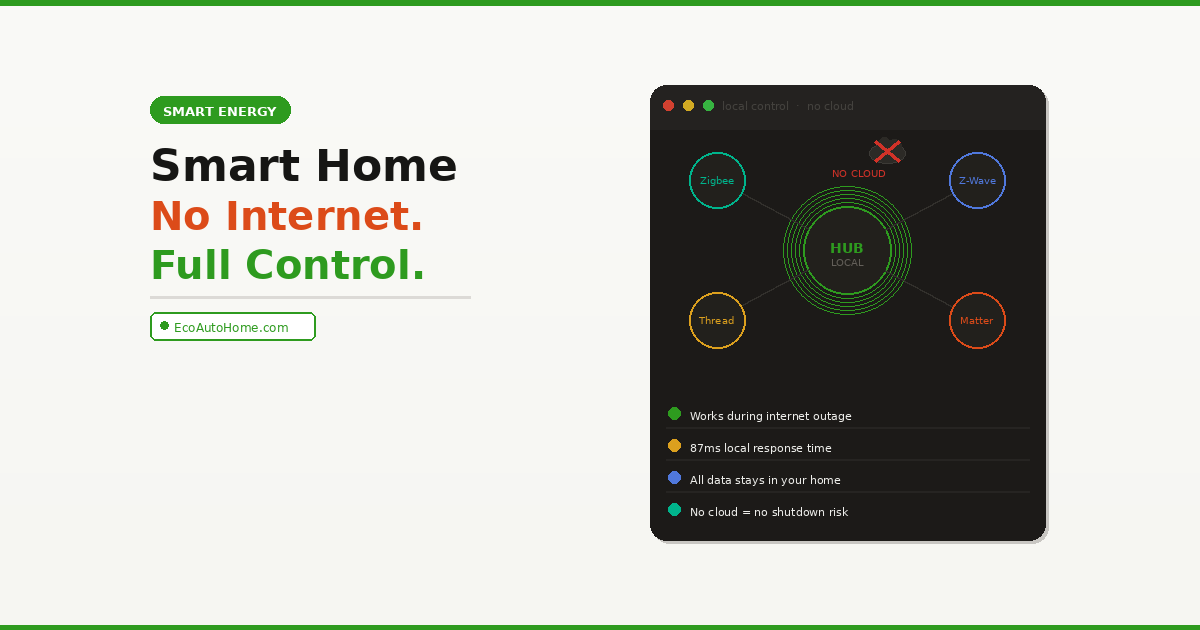
Local control means your automations run on the hub itself without requiring an internet connection or cloud servers. With local control, your lights still turn on when you open the door during an internet outage. Your data stays in your home instead of being sent to company servers.
The Protocols That Make Local Smart Homes Work
Building a smart home without internet dependency starts with understanding wireless protocols. These are the radio communication standards your devices use to talk to each other and to your hub — and the right choice determines whether your setup is cloud-dependent or genuinely local.
Zigbee — The Most Popular Local Protocol
Zigbee is the wireless mesh protocol behind many of the most reliable smart home ecosystems, including Philips Hue, IKEA Tradfri, and Aqara. Consequently, it’s the most widely supported protocol for local smart home control in 2026.
Zigbee is the wireless mesh protocol behind many ecosystems like Philips Hue and IKEA Tradfri. With Home Assistant, you can sidestep brand-specific hubs entirely — simply plug in a single Zigbee USB dongle and build your own brand-agnostic network.
Zigbee devices communicate with each other directly, creating a self-healing mesh network. Furthermore, every powered Zigbee device acts as a repeater, extending the signal range to other devices. This means the more Zigbee devices you add, the stronger and more reliable your network becomes.
Zigbee advantages:
- Genuinely local — no internet required for device control or automations
- Mesh networking — range extends with every powered device added
- Thousands of compatible devices across hundreds of brands
- Low power consumption — battery-powered sensors last 1–3 years
- Under 50ms response time on properly configured networks
Honest limitation: Zigbee devices from different brands occasionally have compatibility quirks, particularly older devices using earlier Zigbee versions. Additionally, Zigbee uses the 2.4GHz radio band, which can experience interference from Wi-Fi networks operating on the same frequency.
Z-Wave — The Premium Local Protocol
Z-Wave is Zigbee’s main rival for local smart home control. It operates on a different radio frequency (800–900MHz) from Wi-Fi, which means it experiences zero interference from your home’s wireless network.
Z-Wave is a completely isolated communication system tailored to smart devices and is built around a dedicated local network just for those devices that doesn’t require an internet connection. That network is created and managed by a Z-Wave controller. A key benefit of Z-Wave is that your controller knows how to talk to everything on your Z-Wave network without the need for proprietary internet servers.
Z-Wave devices are also limited to 232 devices per network and are certified for cross-brand compatibility — meaning any Z-Wave device will work with any Z-Wave hub, regardless of manufacturer. This makes Z-Wave particularly popular for smart locks, security sensors, and devices where reliability is critical.
Z-Wave advantages:
- Zero interference with Wi-Fi — operates on a separate frequency
- Certified cross-brand compatibility — any device with any hub
- Longer range per device than Zigbee
- Particularly strong for smart locks and security devices
- Completely local — no internet required
Honest limitation: Z-Wave devices are generally more expensive than Zigbee equivalents. Moreover, the protocol has fewer devices available compared to Zigbee’s massive ecosystem.
Thread and Matter — The Future of Local Smart Homes
Thread is a newer mesh networking protocol specifically designed for smart home devices, and it’s the protocol underlying Matter’s most capable local control mode. Matter over Thread is fully local — devices communicate directly without any cloud involvement.
Thread devices communicate via mesh without internet dependency. Thread-based Matter devices like the Eve Energy plug and Nanoleaf bulbs work locally via Thread mesh — no internet required for basic control.
Thread requires a Thread Border Router — a device that connects your Thread mesh to your regular IP network. In 2026, Thread Border Routers are built into the Apple HomePod mini, Apple TV 4K (3rd gen), Google Nest Hub (2nd gen), Amazon Echo (4th gen+), and several dedicated smart home hubs.
If you want to understand the full Matter protocol and how it fits into a broader smart home strategy, our Matter Smart Home Standard guide covers everything in plain English.
The Hub — The Most Important Decision You’ll Make
The hub is the brain of a local smart home. It runs your automations, stores your rules, communicates with your devices, and — critically — does all of this processing on your home network rather than in the cloud. Choosing the right hub determines everything else about your setup.
Hubitat Elevation C-8 Pro — Best for Local Control
The Hubitat Elevation is the strongest choice for anyone whose primary goal is a genuinely internet-independent smart home. It’s the hub most recommended by privacy-focused homeowners and smart home enthusiasts for one specific reason: everything runs locally.
The Hubitat C-8 Pro runs automations inside your home instead of on remote servers. Lights, locks, thermostats and other smart home devices and security rules continue working during internet outages — delivering faster response, greater reliability and enhanced privacy.
In real-world testing, Hubitat’s local automations respond in approximately 87 milliseconds — compared to 2–4 seconds for cloud-dependent alternatives. Furthermore, it supports Zigbee 3.0, Z-Wave Plus (800 series), Matter, Thread, and Bluetooth — making it compatible with over 1,000 devices from 100+ brands.
Cost: ~$150 (no monthly subscription required) Best for: Privacy-focused homeowners, large smart home setups, anyone with Z-Wave devices Honest limitation: The interface has a steep learning curve. Setup requires more technical patience than plug-and-play alternatives. However, once configured correctly, it is extraordinarily reliable.
Homey Pro (2026) — Best for Mixed Protocol Homes
The Homey Pro is the most comprehensive local smart home hub available in 2026, supporting seven wireless protocols in a single device.
The Homey Pro 2026 supports Z-Wave Plus, Zigbee, Matter, Thread, Wi-Fi, BLE, and Infrared, processing everything locally to protect your privacy. With double the RAM of prior models, it manages larger setups and more simultaneous devices smoothly.
The local-first processing means automations run even when your internet goes down during a storm. The Homey Pro’s Flow automation system lets you build complex multi-device routines visually — no coding required — while still running everything locally.
Cost: ~$399 Best for: Homes with mixed protocols (Zigbee + Z-Wave + IR-controlled devices), power users who want one hub for everything Honest limitation: The price is significant. However, for large, complex setups, the Homey Pro eliminates the need for multiple protocol-specific hubs.
Home Assistant Green — Best Open-Source Option
Home Assistant is free, open-source smart home software that runs on dedicated hardware and prioritises local control above everything else.
In a fully offline Home Assistant setup, every single automation runs locally. If you disconnect your internet connection, devices continue working normally. Home Assistant is a truly excellent piece of open-source software, maintained by enthusiasts from around the world, and not aligned with any smart home brand in particular.
The Home Assistant Green hub comes pre-flashed and ready to configure, removing the Raspberry Pi setup requirement that previously made Home Assistant inaccessible to non-technical users. It supports Zigbee via a USB dongle, Z-Wave with an add-on, and connects to virtually any smart home device through an enormous library of community integrations.
Cost: ~$99 (Home Assistant Green hub) Best for: Technical users who want maximum flexibility and complete control over their data Honest limitation: Home Assistant has a genuine learning curve. It rewards patience, however, and the community support is exceptional.
Aeotec Smart Home Hub V4 — Best Middle Ground
For homeowners who want local control benefits without the complexity of Hubitat or Home Assistant, the Aeotec Smart Home Hub V4 offers a strong middle ground.
The Aeotec Smart Home Hub V4 delivers SmartThings convenience with Matter and Zigbee support. Many local automations operate without internet through SmartThings local support. It connects via Wi-Fi or wired Ethernet, supports Matter and Zigbee, and integrates with both Alexa and Google Home for voice control.
Cost: ~$70 Best for: Beginners who want some local control without a steep setup process Honest limitation: It doesn’t support Z-Wave, and some advanced automations still require an internet connection through the SmartThings cloud.
The Best Devices for a Local Smart Home
Beyond the hub, choosing the right devices determines how local your setup actually is. Many Wi-Fi smart devices — despite connecting to your home network — still require internet to function, because they communicate through manufacturer cloud servers rather than directly with a local hub.
Smart Bulbs — Zigbee Over Wi-Fi
For local lighting control, Zigbee smart bulbs are significantly more reliable than Wi-Fi bulbs. IKEA Tradfri and Philips Hue both use Zigbee internally, and both work fully locally with a compatible hub.
For Matter over Thread local control, the Nanoleaf Essentials A19 bulb delivers genuine local operation with no cloud dependency and sub-100ms response times.
Smart Plugs — Eve Energy for 100% Local
The Eve Energy runs entirely local via Thread — no cloud account, no data leaving your home, plus energy monitoring to track exactly what each device costs to run. It’s the most privacy-focused smart plug available in 2026, and it works completely offline once set up.
Smart Locks — Z-Wave for Maximum Reliability
Z-Wave is the protocol of choice for smart locks, because it was designed specifically for devices where reliability is critical. Yale and Schlage both offer Z-Wave lock options that work fully locally with Hubitat or Home Assistant — including offline unlocking, access log storage on the hub, and automation rules that don’t depend on any cloud service.
Motion Sensors — Zigbee or Z-Wave
Aqara and IKEA both manufacture Zigbee motion sensors that pair directly with local hubs. Furthermore, battery life on Zigbee sensors is exceptional — 1–3 years on a standard CR2032 battery is typical, because the protocol is designed for extremely low power consumption.
Setting Up Your Local Smart Home: The Right Order
Building a smart home without internet dependency works best when you follow a specific setup sequence. Skipping steps causes compatibility and range problems that are harder to diagnose later.
Step 1 — Choose and set up your hub first. Connect it to your router via Ethernet rather than Wi-Fi wherever possible. A wired hub connection is more stable and reduces latency on your local network.
Step 2 — Add powered devices before battery-powered ones. Smart plugs and light bulbs act as Zigbee mesh repeaters. Adding them first builds a strong mesh foundation before adding battery-powered sensors that need to route through that mesh.
Step 3 — Pair devices in their final location. Pairing a Zigbee device near the hub and then moving it to a distant room often causes connectivity problems. Instead, carry the hub to each device’s final location, pair it there, and let the mesh network establish optimal routing from the start.
Step 4 — Build automations after devices are stable. Give your network 24–48 hours to establish its mesh routing before creating complex automation rules. This ensures your automations reference stable device connections rather than temporary pairing states.
Step 5 — Test internet disconnection explicitly. Unplug your router after setup is complete and test that your core automations still run. This is the definitive test of whether your setup is genuinely local or still secretly cloud-dependent.
For more detail on how to build a complete smart home ecosystem cost-effectively, our Ultimate Smart Home Setup Guide on a Budget covers every device category in order of impact — including which devices are genuinely local and which ones still require cloud access.
What Stays Cloud-Dependent (And That’s Okay)
Building a smart home without internet doesn’t mean you need to eliminate every cloud feature. Several functions genuinely benefit from cloud connectivity, and running them alongside a local core is a practical and sensible approach.
Voice assistants: Alexa and Google Home both require internet for voice processing — they send your voice to cloud servers for interpretation. However, the device control commands they send back can still reach your local hub and execute locally. Consequently, a local hub still responds faster to Alexa commands than a purely cloud-dependent setup.
Remote access: Viewing your home’s status from outside — checking whether lights are on, seeing camera feeds — requires internet by definition. However, your core automations keep running locally regardless.
Firmware updates: Device firmware updates require internet. This is fine — updates don’t happen constantly, and a brief cloud connection for updates doesn’t compromise your local control architecture.
The practical conclusion: Run a local hub for all automations, device control, and security rules. Use cloud services only for voice commands and remote access. This hybrid approach gives you the best of both — local reliability with cloud convenience where it genuinely adds value.
FAQ
Can a smart home really work without internet?
Yes — completely. Smart home devices using Zigbee, Z-Wave, and Thread protocols communicate directly with a local hub on your home network, without requiring any internet connection. Hubs like Hubitat Elevation, Homey Pro, and Home Assistant process all automations locally. Lights turn on, locks secure, sensors trigger routines, and schedules run exactly as configured — regardless of whether your internet is working.
What is the best hub for a smart home without internet?
The Hubitat Elevation C-8 Pro is the strongest choice for a genuinely internet-independent smart home. It processes all automations locally, supports Zigbee, Z-Wave, and Matter, works with over 1,000 devices, requires no monthly subscription, and responds in under 100 milliseconds. For maximum protocol flexibility, the Homey Pro 2026 supports seven protocols in one device. For open-source control, Home Assistant offers the deepest customisation with full local processing.
Do Wi-Fi smart devices work without internet?
Most standard Wi-Fi smart devices do not work without internet, because they communicate through manufacturer cloud servers rather than directly with a local hub. Therefore, when the internet goes down, Wi-Fi bulbs and Wi-Fi plugs typically stop responding. Exceptions include devices using local Wi-Fi protocols like Matter over Wi-Fi — these can operate locally when paired with a compatible Matter controller on the same network.
Is Zigbee or Z-Wave better for local control?
Both protocols are equally capable for local smart home control — neither requires internet to function. Zigbee has a larger device ecosystem and lower device costs, making it the better starting point for most homes. Z-Wave operates on a separate radio frequency from Wi-Fi, meaning it experiences zero wireless interference. Furthermore, Z-Wave is certified for cross-brand compatibility, making it particularly reliable for smart locks and security devices where consistency is critical.
Does Matter work without internet?
Matter over Thread works completely without internet. Thread devices communicate via a local mesh network — they never need to contact cloud servers for basic control and automation. Matter over Wi-Fi can also work locally in many cases, depending on the controller and device implementation. Matter’s local processing capability is one of its most significant advantages over older cloud-dependent smart home protocols.
Building a Smart Home That Works on Your Terms
A smart home without internet dependency is faster, more reliable, more private, and more resilient than any cloud-dependent alternative. The internet outage that renders your neighbour’s entire smart home useless has zero effect on a properly built local system.
The path to local control is straightforward. Choose Hubitat, Homey Pro, or Home Assistant as your hub. Build your device ecosystem around Zigbee or Z-Wave protocols. Add Thread-based Matter devices for the fastest local response times. Test your setup explicitly by disconnecting the internet and verifying everything still runs. Then enjoy a smart home that works entirely on your terms — not on Amazon’s, Google’s, or any other company’s server uptime.
For homeowners with connected thermostats who want local energy management, our Ecobee vs Nest thermostat comparison covers which model integrates most reliably with local hubs. If you’re also running security cameras and want to know which ones support local storage without cloud subscriptions, our Best Security Cameras Without Subscriptions guide covers exactly that.
Your smart home should work for you — not for the cloud.