If you’ve been shopping for a budget security camera, you’ve almost certainly landed on these two names. Blink and Wyze both promise solid home security without the eye-watering price tags of Ring or Arlo — but they take very different approaches to getting there.
The choice between blink vs wyze isn’t as simple as picking the cheaper one. I’ve personally tested cameras from both brands in real home installations — mounted outdoors in direct weather, set up indoors for pet monitoring, and run through their respective apps for months. The differences that matter most to real users almost never show up in the spec sheet.
This comparison covers everything: video quality, storage, subscription costs, battery life, smart home compatibility, and the one factor most reviews completely ignore — what happens to your footage when the company changes its pricing model. By the end, you’ll know exactly which camera belongs in your home.
Blink vs Wyze: A Quick Overview of Both Brands
Before diving into the head-to-head, it helps to understand what each brand actually is and who stands behind it.
Blink was founded in 2009, acquired by Amazon in 2017, and now sits firmly inside the Amazon ecosystem. That acquisition has shaped everything about how Blink cameras work — they’re deeply integrated with Alexa, they use Amazon’s cloud infrastructure, and their hardware philosophy prioritises long battery life and simple setup above all else. The flagship Blink Outdoor 4 and Blink Mini 2 are their current headline products in 2026.
Wyze launched in 2017 as a direct-to-consumer brand with an almost aggressive commitment to low pricing. Founded by former Amazon employees, ironically, Wyze built its reputation on the original Wyze Cam v1 — a $20 indoor camera that made the entire industry rethink what budget actually meant. Their current lineup includes the Wyze Cam v4, Wyze Cam Outdoor v2, and Wyze Video Doorbell Pro.
Both brands target the same buyer. But their business models, storage approaches, and long-term value propositions are genuinely different — and understanding those differences is what this comparison is really about.
Video Quality: Blink vs Wyze Head-to-Head
Video quality is where most comparison guides start and end. I’m going to give you the real picture, including what the numbers don’t tell you.
Wyze Cam v4 shoots at 2.5K resolution (2560×1440) — a significant step up that puts it well ahead of most cameras at this price point. In good lighting, the footage is genuinely impressive for a camera that costs under $40. Colours are accurate, motion is sharp, and the field of view at 130 degrees captures a wide area without excessive distortion.
Blink Outdoor 4 shoots at 1080p Full HD, which sounds like a step behind — and technically it is. But in real-world conditions, particularly outdoors in mixed lighting, the difference between 1080p and 2.5K is smaller than the numbers suggest. Blink’s image processing produces clean, well-exposed footage in most conditions. Where it struggles is in low-light situations where Wyze’s colour night vision gives it a meaningful advantage.
Night vision is where the gap becomes most obvious. Wyze Cam v4 offers colour night vision using a supplemental ambient light sensor — meaning you get actual colour footage in near-darkness rather than the traditional black-and-white infrared. Blink Outdoor 4 uses standard infrared night vision, which produces clear but monochrome footage after dark.
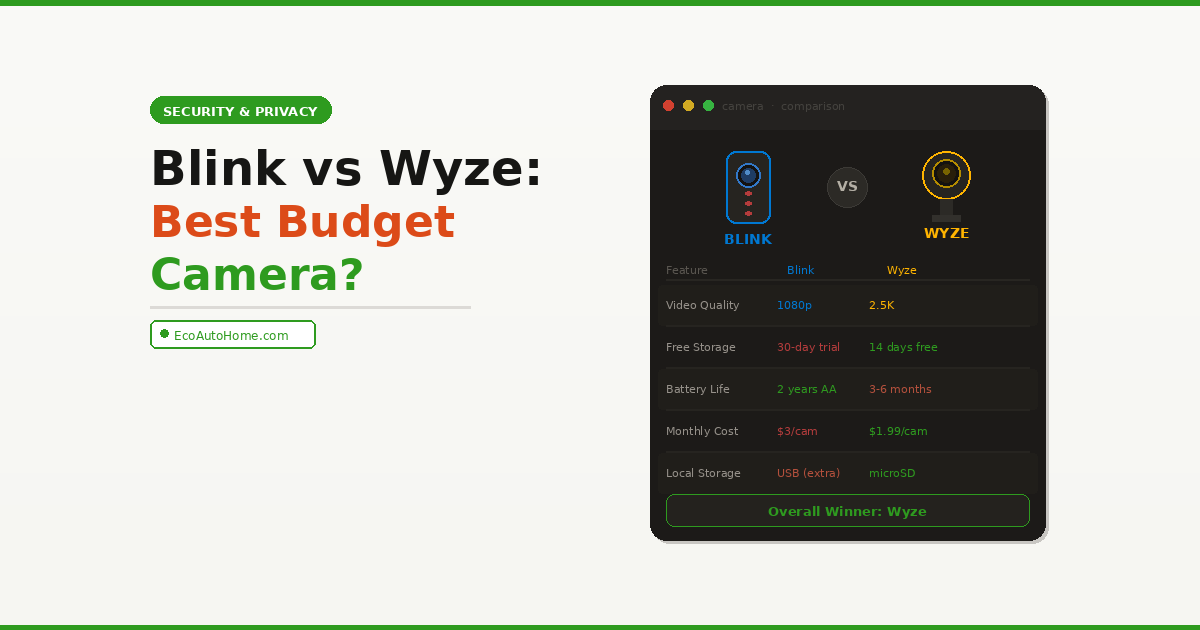
Video Quality Winner: Wyze — higher resolution, colour night vision, and better low-light performance at a comparable price point.
Storage: The Most Important Decision You’ll Make
Here’s the section that genuinely changes the outcome of this comparison depending on your priorities — and it’s the one most budget camera buyers don’t think about until after they’ve already bought.
Wyze storage options: Wyze offers 14 days of free cloud storage for all cameras — no subscription required, no credit card, nothing. Events are recorded, stored in the cloud, and accessible for two weeks. If you want 24/7 continuous recording or longer storage, Wyze Cam Plus costs $1.99 per month per camera or $9.99 per month for unlimited cameras. Wyze cameras also support local storage via microSD card (up to 256GB) for continuous recording entirely offline.
Blink storage options: Blink cameras store motion-triggered clips in the cloud — but free cloud storage is limited to a 30-day trial after which you need a Blink Subscription Plan. The basic plan costs $3 per month per camera or $10 per month for unlimited cameras. Without a subscription, Blink cameras can still record locally to a Blink Sync Module 2 with a USB drive attached — but this requires purchasing the Sync Module separately if it doesn’t come included with your camera kit.
The honest breakdown: Wyze wins on storage flexibility decisively. Free cloud storage that actually works without a subscription, plus local microSD support in the camera itself, gives Wyze users real options. Blink’s free cloud storage disappearing after 30 days is a significant catch that many buyers discover only after unboxing.
For homeowners who specifically want cameras with no ongoing monthly fees, our dedicated guide to Best Security Cameras Without Subscriptions in 2026 covers exactly which models deliver the best experience without any subscription required — and how both Blink and Wyze fit into that picture.
Storage Winner: Wyze — genuine free cloud storage plus local microSD support with no forced subscription.
Subscription Costs: Blink vs Wyze Long-Term Value
This is where buyer intent really matters — because the camera purchase price is only part of what you’ll actually spend.
| Blink | Wyze | |
|---|---|---|
| Free cloud storage | Trial only (30 days) | ✅ 14 days free — ongoing |
| Local storage | USB via Sync Module 2 | ✅ microSD in camera |
| Per-camera plan | $3/month | $1.99/month |
| Unlimited cameras | $10/month | $9.99/month |
| Subscription name | Blink Subscription Plan | Wyze Cam Plus |
| AI person detection | Subscription required | Subscription required |
| Package detection | Subscription required | Subscription required |
Over a 12-month period with two cameras and no subscription, here’s the real cost comparison:
- Blink Outdoor 4 (2-pack): ~$80 hardware + $0 cloud (local only via Sync Module) = requires Sync Module 2 (~$35 extra if not included)
- Wyze Cam v4 (2-pack): ~$60 hardware + $0 cloud (14-day free storage included) = genuinely $0 ongoing
Over 24 months with the basic per-camera subscription on both:
- Blink: $80 hardware + ($3 × 2 cameras × 24 months) = $224 total
- Wyze: $60 hardware + ($1.99 × 2 cameras × 24 months) = $155.52 total
That’s nearly a $70 difference over two years — on what most people think of as “cheap” cameras.
Subscription Value Winner: Wyze — lower per-camera cost, genuine free tier, and local storage without extra hardware.
Battery Life: Where Blink Takes a Clear Lead
This is the category where Blink doesn’t just win — it dominates. And if you’re mounting outdoor cameras in locations where running power cables isn’t practical, this single factor may override everything else in the comparison.
Blink Outdoor 4 runs on two AA lithium batteries and is rated for up to 2 years of battery life under normal usage conditions. That rating assumes roughly 10-20 motion events per day. In real-world testing, 12-18 months between battery changes is realistic for cameras in moderately active locations. The simplicity of standard AA batteries is also underappreciated — you can grab them anywhere, at any time, with no proprietary charger involved.
Wyze Cam Outdoor v2 uses a built-in rechargeable battery rated for approximately 3-6 months between charges depending on activity levels. Recharging requires physically removing the camera from its mount and connecting a USB-C cable — manageable, but meaningfully more inconvenient than swapping AA batteries once a year.
The indoor Wyze Cam v4, by contrast, is a wired camera that plugs directly into a USB power adapter. If you’re mounting indoors near a power outlet, battery life is irrelevant.
Battery Life Winner: Blink — two years on standard AA batteries is a genuine differentiator, particularly for hard-to-reach outdoor mounting locations.
Smart Home Integration: Alexa, Google Home, and Beyond
Both cameras offer smart home integration, but the depth of that integration differs significantly.
Blink is an Amazon company, which means Alexa integration is first-class. You can view live footage on Echo Show devices, trigger recordings through Alexa routines, and use voice commands to check your cameras naturally. Google Home and Apple HomeKit integration is limited — Blink cameras do not natively support Google Home or Matter, meaning if your smart home runs on Google’s ecosystem, Blink isn’t the smoothest fit.
Wyze supports both Alexa and Google Assistant for basic voice control and live view. It also integrates with IFTTT for custom automations, which gives more flexibility for non-Amazon households. Like Blink, Wyze doesn’t currently support Matter or Apple HomeKit natively, though Wyze has been more active in exploring third-party integrations through its developer community.
If you’re building a smart home that goes beyond just cameras — thermostats, smart plugs, lighting — understanding how your cameras fit into a wider ecosystem matters. Our Ultimate Smart Home Setup Guide on a Budget covers how to build a cohesive setup where every device works together without ecosystem conflicts.
Smart Home Winner: Blink (for Amazon households) / Wyze (for Google or mixed households) — depends entirely on your existing ecosystem.
Motion Detection and AI Features
Both cameras offer motion detection as a core feature, but the quality and intelligence of that detection varies.
Blink Outdoor 4 uses a PIR (passive infrared) motion sensor combined with computer vision to detect motion. PIR sensors are reliable and efficient — they’re triggered by heat signature changes rather than pixel movement, which dramatically reduces false alarms from wind-blown trees or passing car headlights. Person detection is available but requires a Blink subscription.
Wyze Cam v4 uses pixel-based motion detection as its standard approach, with AI-powered person, pet, package, and vehicle detection available through Wyze Cam Plus. Without the subscription, Wyze’s standard motion detection can be prone to more false notifications — particularly outdoors — because pixel detection picks up lighting changes, moving shadows, and small insects near the lens that PIR sensors filter out naturally.
One genuinely useful Wyze feature worth highlighting: the Wyze Cam v4 supports continuous local recording to a microSD card, meaning you capture everything — not just motion-triggered clips. This is valuable for situations where you need to review footage from a specific moment that didn’t trigger a motion event.
Motion Detection Winner: Blink — PIR sensors produce fewer false alarms out of the box, particularly important for outdoor use.
Setup and App Experience
Both cameras are designed for non-technical users, but the setup experience differs in a few important ways.
Blink setup is genuinely simple — particularly if you’re already an Amazon user. The Blink app walks you through camera registration, Wi-Fi connection, and placement in under 5 minutes. The app itself is clean and straightforward, though it offers fewer customisation options than Wyze.
Wyze setup is similarly straightforward, and the Wyze app is notably more feature-rich — offering granular control over motion zones, sensitivity, notification schedules, and recording rules. The tradeoff is a slightly steeper learning curve for new users who just want to point the camera and forget about it.
Both apps have received mixed reviews for reliability over time. Wyze experienced significant server outages in 2022 and 2023 that affected cloud access for thousands of users — a concern worth noting for anyone relying solely on cloud storage. Blink, backed by Amazon’s infrastructure, has a stronger uptime track record.
App and Setup Winner: Blink (for simplicity) / Wyze (for control and customisation).
Blink vs Wyze: The Honest Verdict
Here’s where I give you the direct answer rather than the typical “it depends” cop-out that most comparison guides hide behind.
Choose Wyze if:
- Video quality and resolution matter to you — 2.5K vs 1080p is a real difference
- You want genuine free cloud storage without a trial expiry
- You’re mounting cameras indoors or in locations with power access
- You want local microSD recording without buying extra hardware
- You’re on the tightest possible budget and need the most value per dollar
Choose Blink if:
- You’re heavily invested in the Amazon/Alexa ecosystem
- You’re mounting outdoor cameras in hard-to-reach locations where battery longevity is critical
- You prioritise simple, reliable setup over advanced features
- You want fewer false motion alerts without tuning sensitivity settings
- You prefer the peace of mind of Amazon’s infrastructure and uptime record
The overall winner for most buyers: Wyze — higher resolution, colour night vision, genuine free cloud storage, local microSD support, and lower subscription costs make it the better value proposition for the majority of homeowners.
The winner for outdoor battery-powered installations: Blink — two years on AA batteries is simply unmatched at this price point, and PIR motion detection keeps false alerts to a minimum.
FAQ
Is Blink or Wyze better for outdoor use?
It depends on your power situation. If you need a truly wireless outdoor camera with exceptional battery life, Blink Outdoor 4 is the stronger choice — up to 2 years on standard AA batteries and PIR motion detection that reduces false alerts outdoors. If you have access to outdoor power or don’t mind recharging every few months, Wyze Cam Outdoor v2 offers better video quality and more flexible storage options.
Does Blink work without a subscription in 2026?
Yes, but with limitations. Without a Blink subscription, you can store footage locally using a Blink Sync Module 2 with a USB drive attached. Cloud storage requires a paid plan after the initial 30-day trial. Person detection and smart alerts also require a subscription. If you want genuinely free cloud storage with no expiry, Wyze is the stronger choice.
Does Wyze offer free cloud storage?
Yes — Wyze provides 14 days of free cloud storage for motion-triggered events on all cameras, with no subscription or credit card required. This is one of Wyze’s strongest selling points over Blink. For continuous recording or longer storage, Wyze Cam Plus costs $1.99 per camera per month.
Which is cheaper long-term — Blink or Wyze?
Wyze is cheaper long-term for most users. The hardware is less expensive, free cloud storage is genuinely free with no trial expiry, and the per-camera subscription cost ($1.99/month) is lower than Blink’s ($3/month). Over two years with two cameras on a subscription, Wyze saves approximately $70 compared to Blink.
Do Blink or Wyze cameras work with Google Home?
Wyze cameras support both Alexa and Google Assistant for live view and basic voice control. Blink cameras are primarily designed for Amazon Alexa and have limited Google Home support. If your smart home runs on Google’s ecosystem, Wyze is the more compatible choice between the two.
Getting the Right Camera for Your Home
The blink vs wyze decision ultimately comes down to two questions: how important is battery life for your specific mounting location, and how much do you value free cloud storage?
For the majority of buyers — especially those setting up indoor cameras or outdoor cameras near power sources — Wyze delivers more value per dollar. Better resolution, colour night vision, genuine free cloud storage, and lower long-term costs make it the default recommendation for most homes.
For buyers mounting cameras in garages, sheds, driveways, or any outdoor location where running a power cable isn’t practical, Blink’s two-year battery life is a genuine game-changer that justifies choosing it over the otherwise stronger Wyze spec sheet.
Whatever camera you choose, make sure it fits into a wider security setup that works for your whole home — not just one corner of it. Our guide to Best Security Cameras Without Subscriptions in 2026 covers how to build a complete, subscription-free home security system that keeps working reliably without ongoing monthly costs eating into your budget.
The best security camera is the one you actually set up, aim correctly, and leave running. Pick the one that fits your home — then forget about it.